

If you’d like to support me directly (no transaction fees) or just prefer using PayPal for the payment, please follow this easy step-by-step tutorial.
Order directly from PayPal:
- Start your order on the site as you normally would and add your desired items to the cart.
- Go through the checkout process until you’ve selected your preferred shipping option.
- Copy and paste the following template somewhere and replace placeholders with your personal information:
DISCORD (optional)
EMAIL
FULL NAME
COUNTRY
ADDRESS (street + zip code + city)
PRODUCT + VERSION
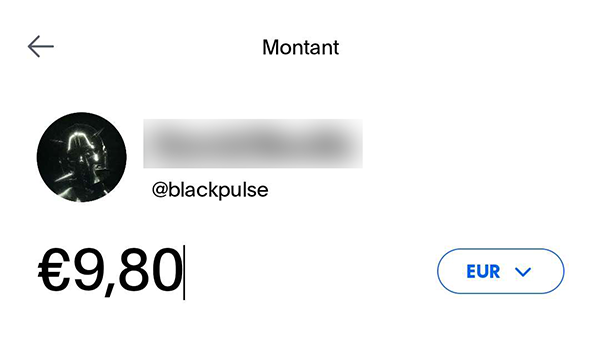
- Log in to your PayPal account and start a transfer to @blackpulse (same profile picture as below) or use paypal.me/blackpulse.
- Enter the exact amount of your order in euros, including preffered shipping method costs.
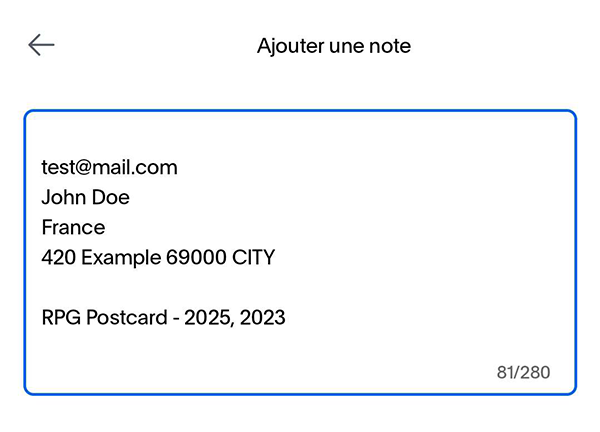
- Add a note to your payment and paste your order details.
Your contact information is very important, as it will be my only way to reach out to you in case there’s any issue with the order.
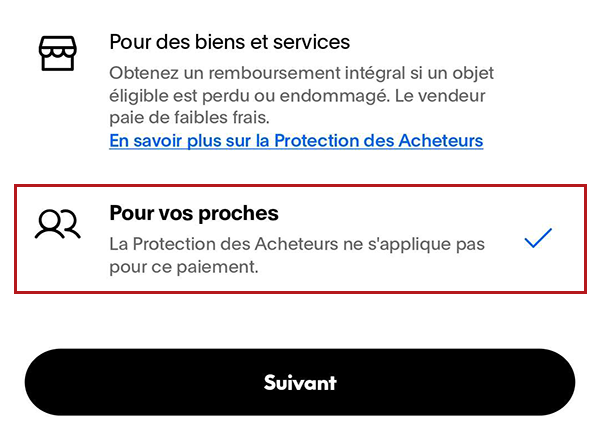
- Proceed and choose “Friends and Family”. This option should be available for personal accounts and does not include transaction fees.
- Proceed again and make sure that everything is correct on the summary screen.
You may have euro conversion fees if you’re outside of the EU, only confirm the payment if you are fully aware of the displayed amounts. I won’t be able to cover or refund any extra fees or costs above the original price.
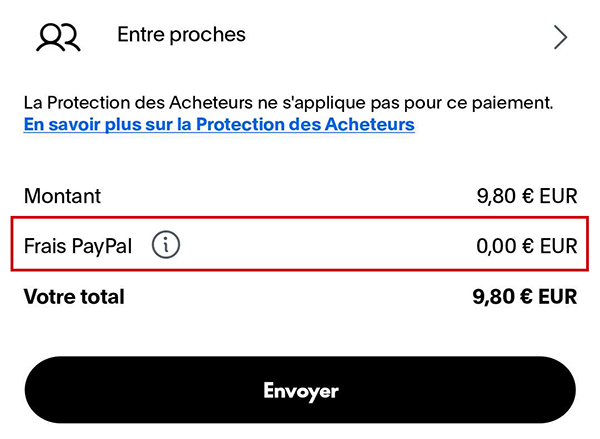
- Click Send and that’s it! You will soon receive an order confirmation email.
If there’s any error in the information you provided or the total order price, I’ll get in touch with you as soon as possible to find a solution or issue a full refund. I’m also easily reachable via Discord (@blackpulse) or the site’s contact form if you have any questions.
Thank you for the support and I can’t wait for you to receive your order! 🖤